


MyAtriumHealth
4.4703.00 Reviews
App Specs
- Version
- 11.7.2
- Updated On
- License
- Free
- Downloads
- 500,000+
- Developer
- Atrium Health
- Categories
- Medical
- Platform
- Android
Screenshots


 Analysis by AppCompare
I approach MyAtriumHealth as a practical companion for people who already receive care through Atrium Health, rather than as a general health tracker. Its main value is bringing care-related tasks together on a phone: checking information, keeping up with appointments, and communicating with a care team. That can make routine administration less scattered, though it does not replace urgent care or a direct conversation when a medical concern needs prompt attention.
Where people can get stuck
The first hurdle is usually not finding the app but getting through account access. Health apps have to connect a person to the right medical record, so identity checks and sign-in details matter more here than they would in a typical shopping or entertainment app. I would take a moment to enter information carefully and use the same personal details associated with care at Atrium Health. A mismatch can turn an otherwise simple setup into a frustrating loop.
It also helps to distinguish account access from the app itself. If a password is rejected or verification does not complete, repeatedly reinstalling the app is unlikely to solve an account problem. I would first check that I am using the correct sign-in details, that the phone has a working internet connection, and that I can complete any requested verification step. If access still fails, the relevant account-support route is a better next move than guessing at alternate personal details.
MyAtriumHealth is a free medical app from Atrium Health, and it has an Everyone age rating. It has an average rating of 4.3 from around 1,700 ratings, with about 690 written reviews, and has passed 500,000 installs. Those figures suggest that many people use it, but they cannot tell you whether your own records or care arrangements will fit your needs. I would judge it by whether it makes your Atrium Health tasks easier, not by popularity alone.
Setup checks that save time
Before relying on the app for an appointment or a time-sensitive message, I would sign in once at home and make sure I can reach the information I expect to use. That small check is more useful than waiting until I am in a clinic lobby with a weak connection and a full schedule. If more than one family member uses the same phone, I would also be deliberate about signing out or confirming whose record is open before reading or acting on health information.
The current version is 11.7.2, and the minimum operating-system requirement is 11. Keeping the phone’s software and the app reasonably current is a sensible first check if something behaves unexpectedly. I would also check ordinary causes such as a dropped connection or a stalled app before assuming that a medical record is missing. A screen that fails to refresh is not, by itself, evidence that a result or appointment has disappeared.
A useful setup habit is to decide what I want the app to do for me before I start tapping through every section. Someone mainly keeping track of appointments may not need to explore every health-information area on day one. I would begin with the next upcoming task, confirm that the relevant details are visible, and then learn other parts as they become useful. This keeps setup manageable and makes it easier to notice what is genuinely unavailable versus what I have not yet located.
Worth Reading Before You Choose

EA SPORTS FC Mobile 26 Is a Bigger Football Game, but It Takes Time

Flipboard Shows What News Apps Must Do Beyond the Feed

Switching to Android Auto Means Rethinking Your Driving Routine

Google Calendar Makes a Crowded Week Easier to Manage

Ludo King Makes the Most of the Minutes Between Plans

Baby Panda World Brings Quick Play to Modern Phones, but Its Game Library Feels Busy
Using the app in a real healthcare routine
If you've ever found yourself tangled in the web of managing healthcare appointments, lab results, and prescriptions, let me introduce you to MyAtriumHealth. This app is designed to simplify the way you interact with your healthcare provider, and after testing it out, I've got the lowdown on what makes it tick.
Getting Started with MyAtriumHealth
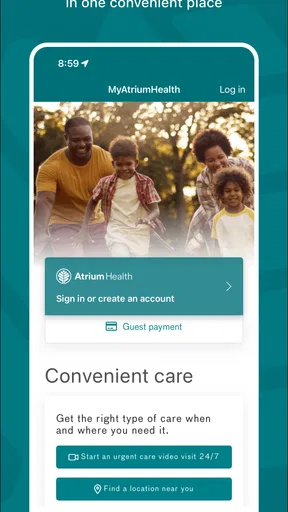
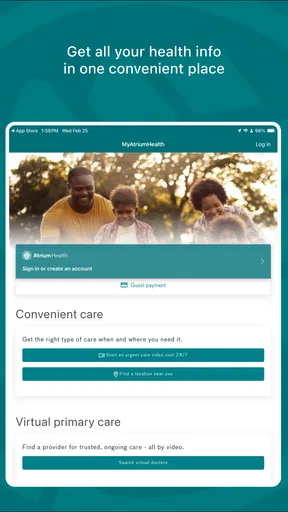
First things first, downloading and setting up MyAtriumHealth is a breeze. Available on both Android and iOS platforms, you just head over to your app store, hit download, and you're off to the races. The app’s interface is clean and intuitive, making navigation a walk in the park. After a quick registration process, which involves verifying your identity through some basic details, you’re ready to dive in.
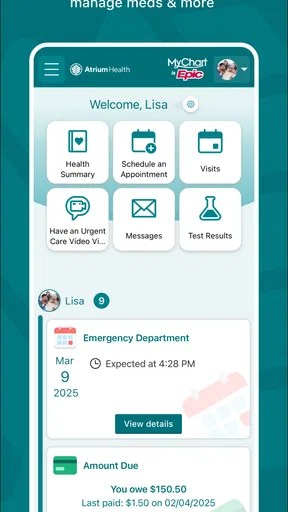
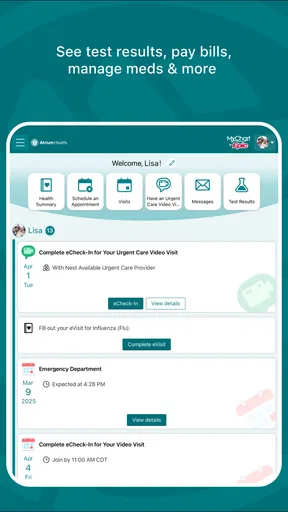
Once logged in, you'll find the home screen neatly organized with different sections like appointments, messages, test results, and more. It's designed to ensure that everything you need is just a tap away. I was genuinely impressed by how easy it was to find my way around.
Managing Appointments
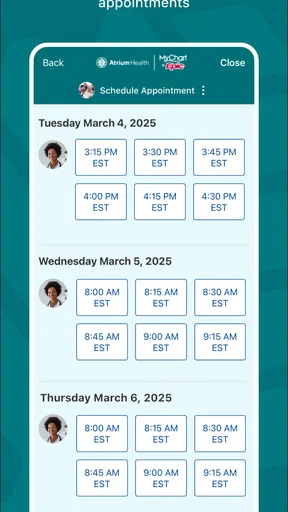
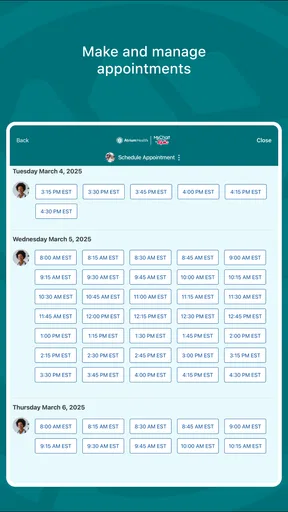
One of the standout features of MyAtriumHealth is its appointment management system. Whether you're booking a new appointment or checking the details of an upcoming one, the process is seamless. You can view available slots, pick what works for you, and even get reminders so you never miss a date.
Rescheduling is equally straightforward, which is a lifesaver if your plans change last minute. Plus, the app provides an option to add appointments to your calendar, so everything is synced up. It’s like having a personal assistant dedicated to your health needs.
In everyday use, I find the calendar option especially helpful when an appointment competes with work, school, or another commitment. I can put the visit alongside the rest of my day instead of relying on memory or hunting through separate messages later. A practical tip is to check the appointment details soon after booking, then add the event to the calendar I actually use. That makes the app part of a routine rather than another place I have to remember to check.
For someone coordinating care for a household, a shared family calendar may still be the better overview. The app can help with the Atrium Health appointment itself, while a regular calendar can show how that visit fits around other people’s plans. I would avoid assuming that one automatically updates the other in every circumstance; checking the saved event after adding it is a quick way to catch a time or location detail that needs attention.
Accessing Test Results
No more waiting by the phone for test results. With MyAtriumHealth, your results are accessible as soon as they’re ready. The app sends you a notification, and you can view them in detail right from your device. It’s comforting to have that kind of information at your fingertips.
The app also offers explanations or notes from your healthcare provider, which can help demystify some of the medical jargon. This feature is particularly useful for keeping track of your health over time.
There is a trade-off to seeing information quickly: a result can appear before I have had a chance to discuss what it means with a clinician. I would read the accompanying note, but I would not treat an isolated number or unfamiliar phrase as a diagnosis. If something worries me, the sensible next step is to contact the care team through an appropriate channel and ask for context, rather than trying to interpret a result from a screen alone.
For a follow-up visit, reviewing available results beforehand can help me make a short list of questions while the details are fresh. That is more useful than opening the app in the exam room and trying to remember what confused me. The app can support that preparation, but the conversation remains important when results need explanation or a decision about care.
Prescription Refills Made Easy
Running low on medication? No worries. The app allows you to request prescription refills without any hassle. It connects directly with your pharmacy, ensuring that you have everything you need without having to make unnecessary trips.
Tracking your prescriptions and understanding what you’re taking is also simplified. It keeps a record of your medication history, which is super handy during doctor visits.
I would still treat a refill request as a request, not proof that a prescription is ready for pickup. If I am close to running out, I would check the request status and confirm with the pharmacy or care team when timing matters. That extra check is particularly worthwhile before travel or a weekend, when discovering a delay at the last minute can be difficult to fix.
The medication history is also a useful prompt when preparing for a visit, but I would not rely on it as the only medication list I carry. If a clinician asks what I currently take, I would mention recent changes and anything prescribed outside the Atrium Health relationship as well. A record in one care app may be helpful without being a complete picture of every medicine or supplement a person uses.
Communication and Support
Need to message your doctor? The app’s messaging feature enables you to send questions or updates directly to your healthcare team. It's a great way to stay connected and get quick responses without playing phone tag.
Additionally, the support section of the app is robust. Whether you need help navigating the app or have questions about your health information, assistance is readily available. The app’s FAQ section and customer support are just a tap away, ready to help out when needed.
Messaging works best for a clear, non-urgent question that can be handled asynchronously. I would keep a message focused: explain what I need, include the relevant appointment or medication context, and ask one or two direct questions. That is easier for a care team to understand than a long account of several unrelated concerns. For symptoms that feel urgent, waiting for an in-app reply is the wrong workflow; a phone call or urgent medical service is more appropriate.
Compared with calling for every routine matter, a message can leave a written trail that I can revisit. Compared with a general email or notes app, it keeps the conversation within the care relationship rather than mixing health details into unrelated inboxes. The trade-off is that messaging is not a live conversation, so it is not the best choice when the answer needs to arrive immediately or when a back-and-forth discussion would be more efficient by phone.
When the app may not be the cause
If an appointment, result, or refill is not appearing as expected, I would avoid assuming that the app has lost it. First, I would check the internet connection, close and reopen the app, and sign in again if needed. I would then confirm that I am looking at the right account and section. If the information still does not appear, contacting Atrium Health or the relevant pharmacy can clarify whether the issue is account access, timing, or the underlying care task.
That distinction matters because a phone app can display information only when the account and care system make it available. Refreshing repeatedly cannot make a pending result ready or complete a refill that still needs review. If the concern is medically important, I would use a direct care channel rather than spend time troubleshooting screens. For a purely technical issue, support is the more useful route; for a clinical question, the care team is the right one.
People who prefer paper records or who receive care from several unrelated providers may also want a broader record-keeping method. MyAtriumHealth is most compelling when Atrium Health is a central part of someone’s care. A general health-record organizer or a personal folder can be a better complement for information gathered across different systems, while this app remains the focused place for Atrium Health tasks.
Who will get the most from it
I would recommend the app to someone who already uses Atrium Health and wants fewer separate steps for routine care administration. It is particularly useful for people who regularly check appointments, want a convenient way to review available results, or prefer sending a concise message instead of making a call for every non-urgent question. It can also help someone preparing for a visit gather appointment and medication details in one place before speaking with a clinician.
It is less suitable as a stand-alone health organizer for a person whose care is spread across providers, or for anyone expecting a mobile app to provide immediate answers to urgent concerns. People who rarely use a smartphone for private information may also prefer to keep using phone calls or in-person support. There is no need to adopt an app simply because it exists; the benefit depends on whether its Atrium Health connection matches the way you actually receive care.
MyAtriumHealth is a medical app developed by Atrium Health. It is free, and its current version is 11.7.2, with support for operating-system version 11 and later. It has been available since July 28, 2011, and its Everyone age rating makes it suitable for a broad audience. Those details are useful context, but the practical question is still whether you have an Atrium Health relationship and want to manage parts of it from your phone.
Final Thoughts
Overall, MyAtriumHealth is a fantastic tool for anyone looking to streamline their healthcare management. It offers a comprehensive suite of features that make keeping up with your health a lot less stressful. From managing appointments to accessing test results and communicating with your healthcare provider, it covers all the bases.
In a world where convenience is key, having an app like this is a game-changer. So, if you’re looking to take control of your healthcare journey, give MyAtriumHealth a try. It's like having your entire medical history right in your pocket.
My more measured recommendation is to start with one concrete task, such as checking an upcoming visit or sending a routine question, and see whether the app fits naturally into your care habits. Keep direct contact options in mind for urgent needs, and use the app as a convenient bridge to your Atrium Health relationship rather than a substitute for clinical advice. With that expectation, it can make everyday healthcare administration feel more organized without asking it to do a job it was not built to do.
Pros
- User-friendly interface enhances navigation.
- Secure login ensures data privacy.
- Appointment scheduling is straightforward.
- Access to test results is quick and easy.
- Supports medication refill requests.
Cons
- Limited customization of notifications.
- Some features require stable internet.
- Occasional login issues reported.
- No offline access to medical records.
- Limited language support available.
FAQs for MyAtriumHealth
What is MyAtriumHealth and what can I do with it?
MyAtriumHealth is a comprehensive health management app designed to give users access to their medical records, appointment scheduling, and communication with healthcare providers. Users can view test results, request prescription refills, and manage family health information, all from a convenient digital platform. It's an essential tool for managing your healthcare on-the-go.
Is MyAtriumHealth secure for accessing my personal health information?
Yes, MyAtriumHealth employs advanced security protocols to protect your personal health information. The app uses encryption and other security measures to ensure that your data is safe from unauthorized access. Additionally, users are encouraged to use strong passwords and enable two-factor authentication for added security.
Can I use MyAtriumHealth to schedule appointments?
Absolutely! MyAtriumHealth allows you to easily schedule and manage appointments with your healthcare providers. You can view available time slots, select your preferred appointment type, and receive reminders. This feature helps streamline your healthcare management and reduces the need for phone calls to clinics.
Is MyAtriumHealth compatible with all devices?
MyAtriumHealth is available for both Android and iOS devices, ensuring compatibility with a wide range of smartphones and tablets. Ensure that your device meets the app's minimum system requirements and has the latest operating system updates to enjoy a smooth user experience.
Can I manage my family's health information with MyAtriumHealth?
Yes, MyAtriumHealth offers features to manage and access family health information. You can add family members to your account, view their medical records, and handle their appointment scheduling. This makes it easier to oversee the healthcare needs of your entire family from one central app.


